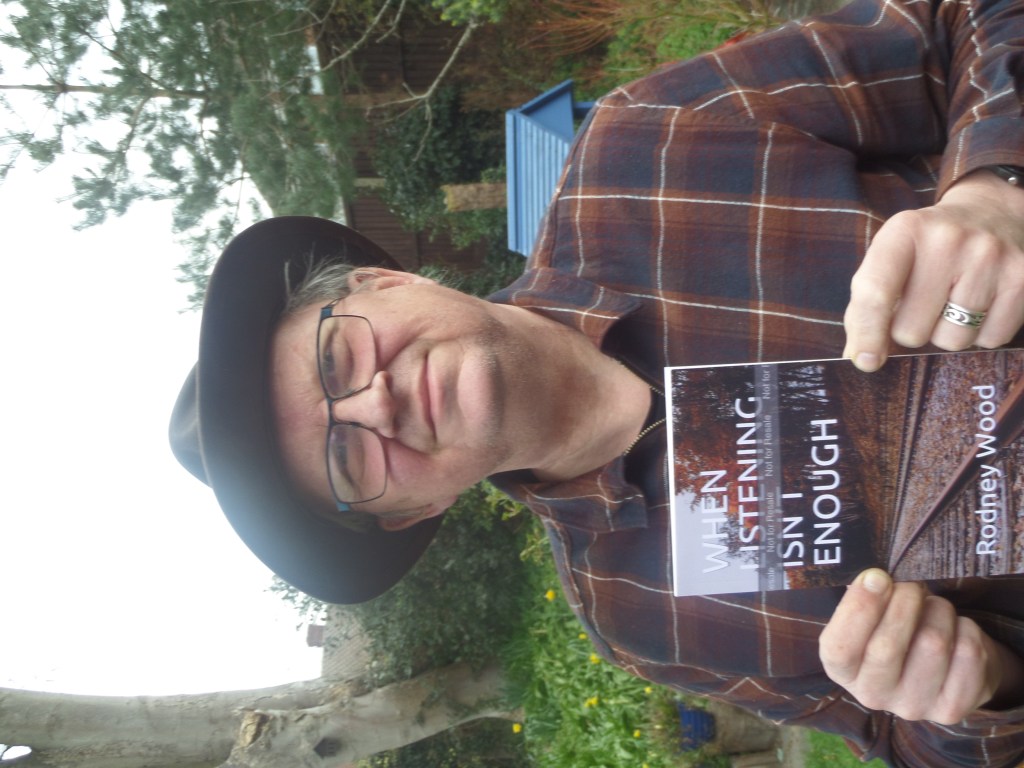
The proof copy arrived today. The photo for the cover worked well, a few headings need adjusting and the page numbers in the contents page are a bit ragged (corrected by using tabs rather than spaces. So loaded the amended WORD document and published it. My page shows “Your recent changes are currently under review. Titles are typically reviewed and published within 72 hours. Review times vary and may take longer if publishing rights need to be verified. Meanwhile, the previous version of your title is live on Amazon and is available for purchase.” When I get the email saying this has been done I’ll order 50 copies.
Apparently during the pandemic Amazon has decided to cut down production of paperback books. Which explains why I won’t be getting the proof copy until Tuesday, a week after ordering it. Meanwhile I’ve been going it and making a few changes. The book is available on Amazon now. That last sentence should really be in bold and sound more exciting.
Although the events happened in 2004/05 I didn’t actually start writing it until 2013. I was dissatisfied with my writing and started thinking about inventing my own form. I thought about what I liked. Repetition “in word and phrase and in idea is the very essence of poetry,” Theodore Roethke. The structure of the haiku. Blues lyrics from Leadbelly to Muddy Waters. German grammar where all the verbs go at the end of the phrase. Michael Hamburger’s “The Truth of Poetry”. John Ashbery and repetition. Add some play and viola a form I was happy with. A poem consisting of 4 (don’t ask me why) 3 line stanzas. I thought of those poems I’d written at the time and recast them in the new form. They turned into about a dozen poems called “The Night Cafe” which I submitted to a Pighog Competition where it was shortlisted. It lacked depth. I put it aside for a few years and started adding and taking away poems till they seemed to tell a story. From first meeting, I never got to know his name, through to him telling me about his life, and me witnessing his suicide. It was much more real, more true now. The title, When Listening Isn’t Enough, came very, very late in the process. I’ve had something to do with the Samaritans for a number of years and remember their attempts to stop suicides on the railways. One of the recommendations if you see someone “at risk” was to engage them in small talk. Perhaps if I’d done that with “Steve” it would have turned out differently but I had my own problems back then, mainly to do with work.
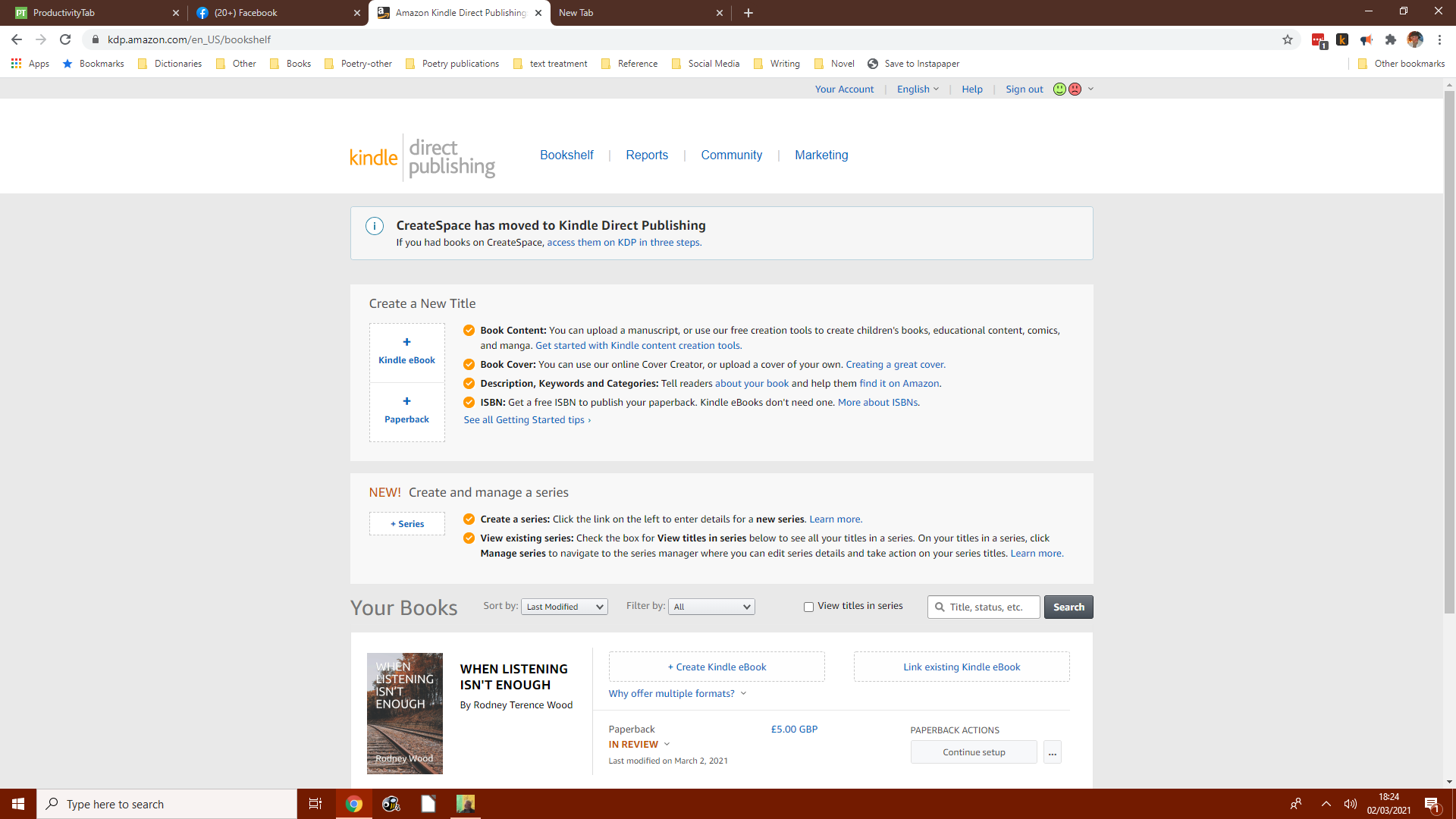
Where a page like this should face you, without my book details obviously. My aim was to publish say 50 paperback copies. Click on Create a new title +paperback. Then you are taken through a number of options and fields for you to enter: language, book title, your name, description, keywords, and category. The next step is to upload the files containing the poems. It doesn’t like .kdp files only DOC, DOCX, HTML or RTF. Luckily the project folder keeps a DOCX file. It was at this stage I added back page numbers to that file.
Launch cover creator to select your cover photo from the hard drive and look at the available templates, with different positioning of the photo,title etc. It is also at this point you can add material to the back cover – biography, description and your photo. Amazon automatically adds the bar code. It would have been nice to add the price here as well but I couldn’t work out how. Then click the Launch Previewer button. This takes a good few minutes. The resulting panel told me I had a problem. The book I wanted was 5×8 but my DOCX files had a page size of A4; luckily kdp can resize the file for you but if could change some formatting. It is at the point you can see if things aren’t quite right you can you back and put them right in the DOCX file and reload. You don’t have to redo the cover. When you’re satisfied click the Save and Continue button.
The next stage was getting together rights, pricing and financial information which proved a bit of a pain. The result was I have worldwide rights on a books costing £5, similar to most pamphlets, with printing costs of £1.70 and royalty of £1.30; Amazon I assume gets the other £2, I could be wrong though. I was happy with everything so clicked the Save and Publish button. My bookshelf, see above, showed my book’s cover and said that’s it’s status was now In Review. It will take about 72 hours for my book to be ready for me to order proof copies. I’ll let you know what it looks like in the next post.
So I gave the poems a run through and used the Preview feature to see what it looked like on a Tablet and Kindle.
telling me to piss off / the click of the receiver
the last words from stone / telling me to piss off the
last words from stone / the click of the receiver
The ideal would be the above with no lines running on. Alas, just about every poem had to be changed. This is a good thing strangely enough because it means you can tighten the poem up by getting rid of excess fat and find even a few more typos..
I’m ready to go and need the following information available:
Your Kindle Create file: When Listening Isnt Enough_KC2.Kcb created 1 March 2021 (folder for projects kcb file and Word document within that.
Book title When Listening Isn’t Enough
Your cover image (2,813 x 4,500 pixels): from https://unsplash.com/ I downloaded a picture 1920 x 2800 pixels
Your book description (4,000 characters or less, including spaces) WHEN LISTENING ISN’T ENOUGH is about my time working in Guildford. After work I used to go to London Road station where I would meet a man called that I called “Steve”. We fell into a routine of smoking a rollie together while “Steve” told stories for a few minutes before the train came. “Steve” had a pig of a life and his only way out was suicide. It might have changed things if I had taken the time to talk back and tell “Steve” that I was also falling apart and failing at work.
Know the category for your book Literature & Fiction/Poetry/British
Keywords (choose up to seven); double keyword phrases count as one keyword, e.g. self-publishing is considered one keyword: poetry, poem,self-publishing, suicide, fiction,21st Century, modern
Your financial information (for your royalty payments): £5 (similar price to other pamphlets)
No problem downloading the Kindle Create app on my Windows computer, or indeed loading the WORD file. It all seems so simple now. The main screen for Kindle Create:left hand column show the structure of the book (+ to expand) and is divided into 5 parts. Title page, Copyright page, Table of Contents (which is created automatically), the actual poems and the back matter. A lot of cutting and pasting and changing formatting (poem title became Chapter Titles). After an hour of two messing about it looked pretty good, The is a preview button on the top right which show me how the finished product would look. It looks ready to go my only concerns are The title page and copyright page are in the Table of Contents, but that’s not really a major issue. The project is now saved. A final ruin through I think before I self publish. More detailed info at kdp.amazon.com/en_us/help
The Independent Publishing Network took their £30 and emailed me back with an ISBN and barcode that should be placed on the bottom right hand corner of the back cover. To me though one of the great advantages of using IPN was that it meant I didn’t have to think up the name of a press. Ace Press, Aldershot City Press, Applewood Press, Arcadia Publishing, Pond Books, Autumn House Press, Bruyno Press, Beacon Publishing, Bonnier Little Press, Book Publishing Of Farnborough, Bright Skies Press. Little Wood Press. I could have spent weeks wasting my time thinking of names.
The useful things I did on my document yesterday were: get rid of any bold (all headings) and italic (twice) styles. For the heading: change to 14pt and centre. Manually insert page numbers at the bottom of the page and centre. There was also the question of which font to use, Garamond, Didot HTF crossed my mind until I found out KDP didn’t like anything fancy, so I stuck with Arial to circle my poems with. I’m so glad the pamphlet is only 24 pages long.
Acknowledgements. There are a number of variations here. Some people seem to be saying that the poems have not been edited since they appeared in a magazine., So I made sure I said “published these poems or versions of them’. There is almost a case for actually naming the editors as well, but no one does, yet at least. When it comes to the magazines some just list them out while others list the magazines and the poem/s that appeared in them. I chose the latter and ended up with: Acknowledgements: Thanks are due to the editors of the following magazines who published these poems, or versions of them: Envoi (‘Youth’, Self-Portrait With Garbo’, ‘Dossing Outside’,’Lonely Nights’, ’Suicide’ and ‘Watching From The Bridge’), Message in a Bottle (‘Methadone’), The Lake (‘Bewildered’ and ‘Good Enough To Bury’), The Reater (‘The Polisher’), Breakfast All Day (’The Dishwasher’), Krax (‘Seeing Himself’ and ‘Arrest’), Prole (‘Consolations’), Headlock (‘Underground’).
Some authors like to thank all the big names they have had a cup of coffee with so you know how well connected they are. Can’t say it impresses me.
The first step must be having something to publish in the first place. I toyed with the idea With the idea of amalgamating my poems about the Black Death but then I thought perhaps I should work on something a little smaller start off with. So I thought about a pamphlet about the groups I saw at the West End Centre, poems with titles from the Gale and Polden back catalogue, from the exhibition Mondo Cane I saw the year before last, or some ekphrastic poems. For some reason, none of them seemed quite right but then I remembered I had a series of about 30 poems about Steve who I used to meet after work and who told me about his life if. That was the one I decided on. I looped closely and decided the 6 poems didn’t fit it and at least three needed major rewriting. I did spend a lot of time thinking of just the right title, “Steve Singing the Black Psalms”, just didn’t seem right other titles I came up with like “Hat in a Hatless World” or even the simple “London Road” didn’t seem to cut it up somehow. But then I thought, after a night’s sleep, I should perhaps change the last poem which was about Steve throwing himself in a river to Steve throwing himself in front of a train and that seemed to chime with what the Samaritans were doing. I’m sure you have seen the notice at railway stations asking you to call the Samaritans to talk before you do anything. “When listening isn’t enough” seemed, right and natural. All I did with Steve was give him a cigarette, letting talk and then I caught the train, I mean I didn’t even know if Steve was his name.
There is space here to insert the acknowledgements. Acknowledgements: Thanks are due to the editors of the following magazines who published these poems, or versions of them: Envoi (‘Youth’, Self-Portrait With Garbo’, ‘Dossing Outside’,’Lonely Nights’, ’Suicide’ and ‘Watching From The Bridge’), Message in a Bottle (‘Methadone’), The Lake(‘Bewildered’ and ‘Good Enough To Bury’), The Reater (‘The Polisher’), Breakfast All Day (’The Dishwasher’), Krax (‘Seeing Himself’ and ‘Arrest’), Prole (‘Consolations’),Headlock (‘Underground’).
The third page is for the contents. I created it in LibreOffice using the automatic insert table of contents then cut and pasted it to a blank part of the page and then deleted the table of contents which leftthe title of the poems and the page numbers which had to be justified. The next section was the poems.
I said I’ll come to the ISBN and publisher. For £30 I joined the Independent Publishing Network which gives me an ISBN number and let me list the publisher as the Independent Publishing Network, instead of making up the publisher.
After you’ve been writing a while and sending poems off to magazines you obviously think of the next step, a pamphlet. You try competitions and sending to publishers who may or may not respond. It’s a lot of work, not only finding the right 20 or so poems but also writing about your poetry “experience”. For whatever reason no one is going to take a collection of poems from me and I’ve had over 300 poems published by magazines.
That leaves me two options. Vanity publishers have never appealed. They won’t consult you and they won’t offer much in the way of marketing or distributing the book. They aren’t isn’t interested in selling copies of the book, they doesn’t need to – they’ve already made their profit from the hefty ‘contribution’ fee they charged the author. In saying that if you know what you’re getting into then fine. Self-publishing has been around for years (Virginia Woolf did it, as did Mark Twain and James Joyce. William Blake did nothing else. I’ve also just brought “Collected Poems 2005-2020” by Mitch Sisskind, 150 pages printed by Amazon ) and is a perfectly respectable way to get your book into print. The rise of Kindle Direct Publishing makes the process easier, for an eBook or a print-on-demand book. You are involved in each stage of the process but still have to do your own editing and marketing. Another advantage is the quick publishing time. It’ll be an interesting journey and I’ll post regular blogs along the way.
The first step is to download the Amazon KDP: Complete Guide to Kindle Direct Publishing (Step-by-Step) at https://selfpublishing.com/kdp/ to get an idea about what is involved.
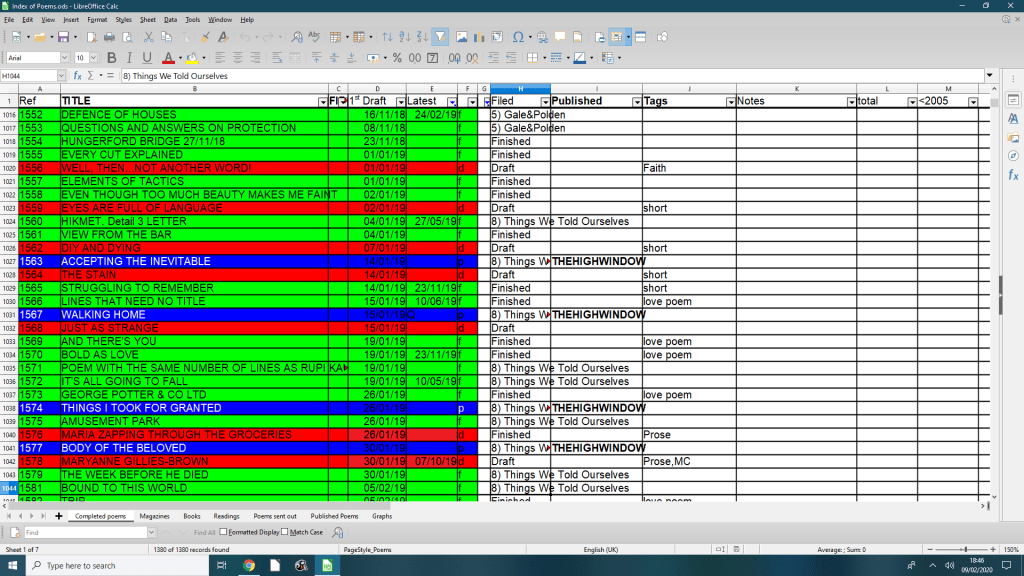
I started using one at work and found it useful and fun. Once I went on an advanced spreadsheet course and found there was just me and the tutor. No surprise therefore to learn I keep a spreadsheet (with at least six pages) to keep track of my poems and I have over a 1,000 mainly failed attempts at a poem but I like to keep everything. I have one sheet which is just a list of poems written (including when, date revised, draft or finished or published and sometimes a brief description eg ekphraistic); another which is a list of magazines including the year/month it was sent; another a list of the magazines sent, date sent and date returned, comments, accepted or not, and another part of the sheet with the magazine, date sent and poem number(sorted by that); a simple list of poem published and where; plus two other sheets for pamphlets sent to publishers and reading attended.
It keeps me quite busy making sure everything is in order but it’s very satisfying. I could say it makes sure I don’t send the same poem to different magazines at the same time or I don’t keep sending the same poem to the same magazine, but it doesn’t always work. At the end of the year I can always count up how many poems (round the 50 mark) I’ve written and how many I’ve sent out to magazines (12 or so) and how many poems I’ve published (about 12). Any figure that makes me feel good really.
Of course there’s a sheet missing. There should be one for books read as well. Don’t ask me why there isn’t.
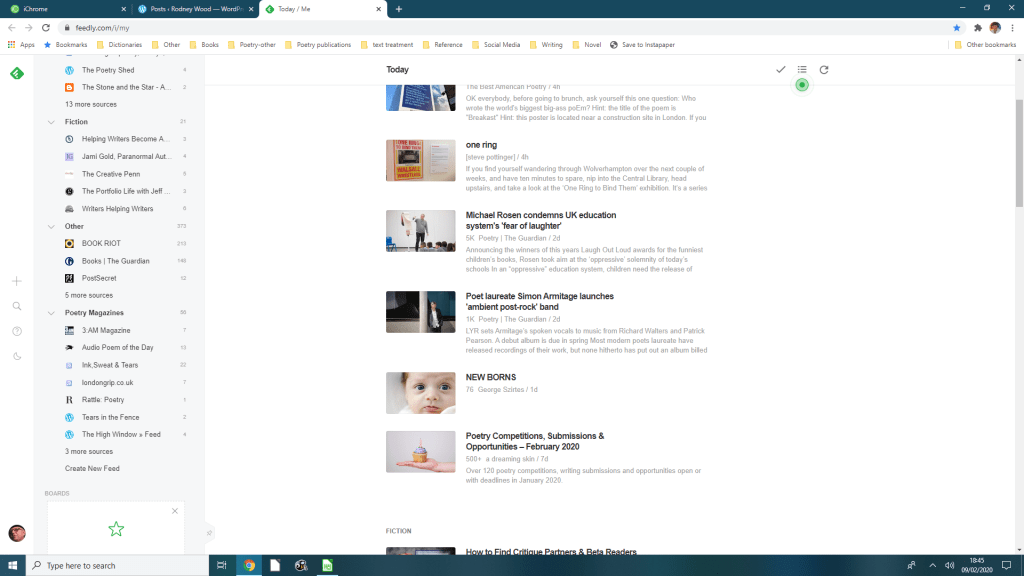
A useful webite or app is Feedly.com which allows you to list your favourite websites you want to read. So I have all my favourite blogs and poetry magazines in one place.
Rodney Wood worked in London and Guildford before retiring. His poems have appeared recently in The High Window, Orbis, Magma (where he was Selected Poet in the deaf issue) and Envoi. His debut pamphlet, Dante Called You Beatrice , appeared in 2017. He is joint MC of the monthly open mic nights at The Lightbox and is also the Stanza Rep for Woking. You can find more information about Rodney and his work at rodneywoodpoet.wordpress.com
‘I always look with admiration at poets like Ken Smith, Matthew Sweeney or Paul Durcan who have a unified voice, vision and form in which they can express themselves. I can’t always do that but every now and again I try a new style. Between January and March this year I wrote poems that were short, simple, dreamlike and had a bitter edge before moving on to something new. I console myself with the thought that success is not the number of books or poems published but having the time and space to write. I think you should take poetry seriously but never yourself.’ RW
x
*****
*****
Rodney Wood: Six Poems
THINGS I TOOK FOR GRANTED
I edge along the wall of your house until I find the brick that sticks out. Gently I pull it free & find hidden behind the fragments of your memory
it’s like a madman had smashed a statue with a hammer and I have to make and remake the pieces even though I’m parched walking in the desert
towards the saltwater of urine, tears & alcohol
ACCEPTING THE INEVITABLE For Jim Lindop
He asks for a bottle of whisky xxxxxxxxxxxxxand I give him two one for the pain xxxxxxxxxxxxxand the other for me to watch xxxxxxxxxxxxxthe pain melt away.
BODY OF THE BELOVED ‘We both knew we were doomed.’ Jessica Piazza
A simple sermon from the pulpit convenient shorthand for uniting man and god, man and woman the lover and their love even this life xxxxxxxxxxxxxand the one before
FALLING SILENT
autumn is falling and wind threatens clouds, leaves and feathers
pain is silent says a stone calmly reading the grass
WALKING HOME
drops of light xxxxxxxpierce the dawn your words a path xxxxxxxthrough the forest and all trees sway xxxxxxxbeneath the sky as if you’re xxxxxxxcoming to meet me
POEMS I WILL ALMOST CERTAINLY POST ON INSTAGRAM
beauty is seeing through all this stuff and nonsense
I spread out the language of days xxxxxxxxxxxxon the table and remember those I erased
On the table outside I left a plate and let the air eats its fill
I leave myself open but then you’re supposed to when you write
I wonder if our mothers and fathers are related?
the sun has fallen beneath the waist of the dark horizons
the soul poisons the body some carry it inside to others it’s a shadow walking by their side
love and the sea asking impossible questions
I’m smiling the way only skulls can smile
I don’t worry about grazing my poems on the slopes of Mount Parnassus
you should see my inner sun that allows me to live in tropical splendour
I must write the last line before I leave this poem




 Rodney Wood